
20+ years old Wilson Pro Staff Classic & <1 year old Head Speed MP 315
Old and new

HK → UK → US → ?
20+ years old Wilson Pro Staff Classic & <1 year old Head Speed MP 315

I can’t believe it has almost been 3 years since I wrote about my data storage and backup strategy! In that post, I mentioned near the end that I would be experimenting with online backup solution. To cut a long story short, I started with Mozy (crappy OS X client), then Carbonite (didn’t support external drive), and ended up using CrashPlan instead. It took a while (as in months) to back up all of my iMovie files, Aperture vault, plus other files totaling ~1.5TB to CrashPlan but it is all worth it because just over 2 weeks ago my Drobo started failing. The only reason I noticed it was failing is because I wanted to edit June’s NY Alt.NET meeting’s videos and iMovie hung on startup. Took me a while to pin it down to the Drobo/Hard Disks because I don’t have a lot of free time nowadays with 2 toddlers running around the apartment.
Turned out almost every file I tried to open on the Drobo failed with I/O error. And there didn’t seem to be a pattern as to which files are good and which are bad. Fortunately files I restored from CrashPlan seem to be fine so at least I have a good copy somewhere. After some more probing and waiting for Drobo customer support to response to my help ticket (not very helpful), I ended up purchasing the Synology DS1512+
Replacing my 2nd generation Drobo with a NAS has been on my plan for a while. Leah’s Macbook is getting full and some point in the future I will be replacing my 7 years old MacPro with a new machine, probably a laptop with SSD (Macbook Pro with Retina Display? Yum!) and it won’t make economic sense to store everything on the SSD or attached an external drive to a laptop. The Drobo failure just pushed the purchase decision up a few months.
The setup now consists of:
I’m still undecided on what to do with the Drobo enclosure and the remaining three 1TB drives. One of the drive will replace an old 500GB drive in the external drive that I use for mirroring my MacPro internal drive. I may create a RAID-0 setup for the MacPro using the remaining two 1TB drives. But then again, considering the amount of work involves I probably won’t.
After setting up the NAS and created the volume which took less than an hour, the first thing I did is set up CrashPlan on the NAS itself. Since Synology NAS runs a variant of Linux (BusyBox), it is (relatively) easy to setup CrashPlan’s linux client and runs it headless. Relatively easy as in if you are familiar and comfortable with working in *nix terminal shell.
To administrate this headless client, I need to run the CrashPlan GUI client on my Mac and connect to the NAS via SSH. This turns out to be a little hacky. To make life a little easier, I make a copy of the GUI client, edited the necessary settings, and setup SSH local port forwarding. Even with this, I still need to open up a terminal, ssh into the NAS, then run the GUI client. I think it may be possible to script this process but I haven’t spent time to research that.
I have the CrashPlan+ Family Unlimited account and it is simply a matter of adding the Synology to CrashPlan as a new machine and started backing up files directly from the NAS.
The first batch of files I restored were my iTunes library. The process to switch iTunes from using the Drobo to NAS was much simpler and more straightforward than I thought it would be. Simply change the iTunes library location in the Preferences. Clicked ‘Yes’ when it asked whether I want iTunes to move files to new location (this will only move some files). Then tried to play a file (any will do) and let iTunes figure out the file’s new location. Done. I didn’t use the library consolidate function because iTunes will try to copy the files to new location, which won’t work as the files were all corrupted on the Drobo.
I did use the consolidate function for Leah’s Macbook and the copy process took less than an hour over Gigabit ethernet. As the original files are left untouched at the old location, I’m planning to delete them to free up space after a week or so of usage.
I keep the main Aperture library on local disk for speed with an Aperture Vault on the Drobo. Instead of restoring the vault, it will be much faster to just create a new vault on the NAS. Despite the fact I get pretty decent write speed to the NAS (~70Mbps vs. ~15Mbps with Drobo), it took a rather long time to create the vault. Probably due to the fact that Aperture vault consists of large numbers of both large files (images) and small files (delta edits, meta-data, etc.).
This turns out the be the trickiest of them all for 2 reasons:
One solution is to create a disk image on the NAS that is formatted to HFS+, mount it in Finder, then move the iMovie event/project files to it. This definitely works for iMovie (and Final Cut Pro X) so I decided to keep that as an option and tried something less certain but less work. (I’m lazy, ok?)
Thanks to the power of Google, I found this undocumented terminal command that makes network volume show up in iMovie:
defaults write -app iMovie allowNV -bool true
I then moved the files to the NAS volume using iMovie just like I would with the Drobo. It took a long time for iMovie to start the file move operation but once it started the transfer speed was decent (~35Mbps). Much faster than the Drobo but no where near saturating the Gigabit ethernet.
I haven’t done a thorough check on the iMovie project yet. But the cursory check I’ve performed, it looks like this hack works. If and when Final Cut Pro X supports NAS, that will be a very compelling reason for me to upgrade.
Just straightforward CrashPlan restoration from my MacPro onto NAS volume. This will take a while as I’m only getting 9-10Mbps download speed from CrashPlan (my FiOS is 35Mbps both up and down). The restoration requires my MacPro to be running and with the heat during the day, I only run the machine during the evening so it will be at least a week before all the files are restored.
So what are the lessons from all this.
One can only hope the RAID system will report the failure and continue to work while waiting for replacement disk. Drobo in this case did not do that. It just failed, epically and silently.
Even with RAID system
Drink couple less Starbucks a month and you are protected.
Because I knew I have a copy of the data safe with CrashPlan. Desperation will only come if you know there is a high chance you’ve lost your valuable data.
In this case, not CrashPlan but one of the backbone ISP between CrashPlan and me.
I bought the Drobo because of its redundant feature. If a single disk failure corrupts data, I might as well go with a eSATA external drive and spare the expense. Even if Drobo sends me a replacement unit for free, there is no easy way to regain my trust again. How would I know if the new unit won’t fail silently like the last one?

After my first attempt at organizing an emergency bag (or Bug Out Bag, B.O.B.), I haven’t done anything to refine/complete the setup. This is mainly due to lack of time. However, recently I started listening to In the Rabbit Hole podcast and there are a trove of useful information. From the EDC episode, I realize my EDC (Every Day Carry) is really inadequate so last week I set out to improve it.
Previously I had a Fenix EO5 flashlight and Leatherman Squirt PS4 on my keychain. When Leah gave birth to the girls I gave her the flashlight and Leatherman for her diaper bag, and I bought myself a JETBeam BA10

First, because of the increased number of items I want to carry with me, it is much easier and better organized if I store the items in a bag. I picked the Maxpedition E.D.C. Pocket Organizer
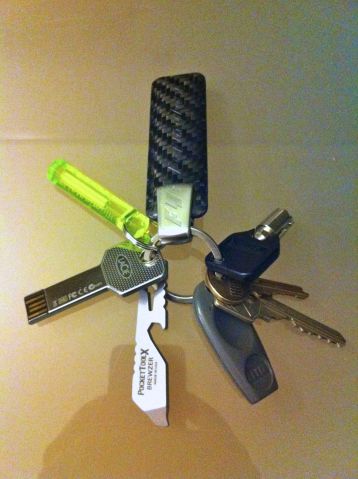
For the keychain, I added three items. First, a PocketToolX Brewzer

I’ve also learnt a lot from the podcast about other items that I should include in the B.O.B. In addition to the B.O.B, I’m going to build a baby B.O.B. for the girls specifically and a mini B.O.B. for the car. All of these will be in future posts.
During the holiday season last year, I traded in my Golf GTI for a Acura TSX Sport Wagon. Acura, being a luxury brand, means even the base model has lots of features and plenty of attention paid to details. Even though I miss the ‘pocket rocket’ power and handling of the GTI, the TSX is no slouch either despite much longer, heavier and with less torque from the engine. It still drives great and the multi-link suspensions handle bumps way better than the GTI, which become more important with two sleeping babies in the backseats. The increase of trunk space (more than 3X the space GTI has) is the feature that both Leah and I love.
However, couple of minor details remains to be improved by Acura:
Acura, to their credit, has been pretty responsive when I voice my complain on Twitter. They even have someone phone me to follow up and promise my opinion is taken seriously. Would my complain change the next generation of TSX? Perhaps, or perhaps not. We’ll see in four years time when the car lease expires and it’s time for me to look for a replacement.


 Lost in Colonisation