NYC ALT.NET user group

A group of like minded .Net developer and I have started a local ALT.NET user group for the NYC area. Our first meeting will be held on Thursday, September 25th, 6:30 PM at the Microsoft office in midtown Manhattan.

The topic for the first meeting is: Object-Relational Mapping: the philosophies and the tools. More details can be found on our user group web site: http://nyalt.net/ or you can RSVP directly on the meetup.com page.

Read and post comments |
Send to a friend

What? A year already?

How time has flied! It has been a year since I joined ThoughtWorks. In the last 12 months, I've:

  • Visited ThoughtWorks India in Bangalore
  • Worked in 3 totally different projects (.Net desktop app, build & deploy at an enterprise level, and Agile coaching) in 3 different locations (London, Connecticut, New York)
  • Became a committer of an Open Source project, DbDeploy.net
  • Attended ALT.NET conference in Seattle
  • Started ALT.NET NYC with a bunch of great, like-minded developers
  • Edited 4 ThoughtWorks IT Matters podcasts
  • Helped out with recruitment (code reviews, office interviews, phone interviews)
Skills and tools that I've learnt/developed that I didn't think I would otherwise:
  • Agile project management, planning, estimation (Mingle)
  • Presentation and coaching (PowerPoint!, public speaking)
  • Build & Deploy (CruiseControl.NET, Cruise, TeamCity, NAnt, MSBuild, PowerShell, etc.)
  • iPhone development
  • Mocking (NMock, Moq)
  • UI Automated testing (Selenium)
What I can't quantify is the amount of learning I've done during this time. Working with smarter people than myself drove me to self-improvement in ways that I did not think I can or would.
I don't know what would happen in the next 12 months but one thing for sure, I would definitely enjoy it.

Read and post comments |
Send to a friend

Tech book on Kindle

I met Brian Donahue at ALT.NET in Seattle a couple of months back, and earlier this evening he tweeted that he was curious how well code in PDF would display on the Kindle. So I replied and told him I'll try it out and show him the result.

The process of converting a PDF to Kindle format is very simple. Since I am at my computer I don't need to send the PDF to my Kindle wirelessly, so I emailed the PDF (5.6MB) to my 'free' Kindle email address: alexhung@free.kindle.com. I received back the converted .azw file (2.6MB) from Amazon within a couple of minutes. I copied it to my SD card, popped it into the Kindle, switched it on, and there it was right at the front page. 

So here's a screenshot of the original PDF taken from Preview.app:

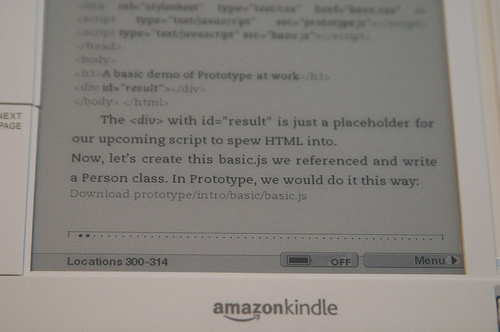
And here are how the roughly same page looks on the Kindle:
As you can see the colouring and the code font are gone, obviously, the line-break is off and the download links are gone too but these are to be expected. But overall, I am impressed by the quality of the conversion. The text is properly converted, i.e. not being displayed as a bitmap image. Even the table of content is navigable (it doesn't show up as in the Kindle menu though).
Despite the good quality, I am still not completely convinced the Kindle is a good way to read tech book. Simply because there is always a lot of flipping back and forth when I read tech book, especially reference books, and the Kindle page by page flipping is way too slow. But for regular PDF book, I think the Kindle works just fine.
(Note that I took the photos indoor with flash, at ISO 1600 handheld. Even with image stablizer on, there are still some handshakes.)

Read and post comments |
Send to a friend

Video of Alt.Net Opening

You can probably see me standing in the back, as I got there late!

Read and post comments |
Send to a friend

Website Built with WordPress.com.

Up ↑