Philadelphia Experiment

Leah and I went to Philadelphia on a weekend trip this past weekend. For me, it was two days of experiments. All of which are for our trip to Naples/Pompeii later in July.

Canon 50D
The 50D is a vast improvement over my old 10D, bought way back in 2003. The increase in pixel count is obvious, but it is other much more subtle features that impress me. First, the quick startup time from sleep mode. The 10D takes about 5-10 seconds to wake up, thus sometimes I would miss shots. The 50D wakes up and ready to shoot almost instantaneously. The LCD screen is of course larger but it is the colour rendition that makes me take notice. With 10D, the LCD is always too bright and colour too saturated. The screen is still slightly too bright but the colour is almost spot on so preview is actually accurate. The low(er) noise level on high ISO settings makes it, for the first time for me at least, viable to shoot indoor with ISO1600 without worrying about unusable image. Images are still noisy but at least it is manageable.
Kata DR 467
I've been using a camera hipbag inside my Oakley backpack on trips for a few years now. Mainly so it is not obvious that I'm carrying an expensive digital camera. While that worked fairly well, it was awkward to store and retrieve the camera as I have two bag openings to deal with. Alex Lindsay (from PixelCorp and MacBreak Weekly) on Twitter recommended Kata DR-467 for travelling with DSLR. I looked online as well as touched it for real in B&H before deciding to buy it. After this weekend, I was so glad I bought it! I can't believe I didn't get it earlier. The slide out compartment at the bottom for the camera and lenses are the best feature, making it very easy to store/retrieve camera on the go.
GeoCoder
I've always wanted to geotag my photos so this trip was a perfect opportunity to utilise the built-in GPS in my iPhone to try that. I found on the AppStore this free app, GeoCoder, which claims to make geotagging easy. It was pretty easy to use and I just needed to remember to start a 'recording' in GeoCoder at the beginning of the day and stop it at the end. I was afraid that it would drain my battery quickly but it turned out not to be the case.
I was pretty excited about this whole geotagging thing until I got home and tried to use the GPX files GeoCoder produces in Google Earth. Turns out the iPhone GPS receiver is not sensitive enough to pick up GPS signal when the phone is in my pants pocket! So all I have are a handful of GPS locations whenever I took my phone out for a quick Twitter check or the iPhone happened to have enough signal.
So GeoCoder is out for me for the time being.
For the Naples/Pompeii trip, I have considered using one of my iPhone case and strap it to the Kata's shoulder strap in order to get decent GPS signal for the iPhone. Or I can purchase one of the cheaper GPS recorder and use that instead. I'd probably still need to expose the recorder to the sky somehow though.

Read and post comments

|

Send to a friend

Agile Firestarter in NYC

A bunch of us from the NY Alt.NET and Stephen Forte have organized a Agile Firestarter event on June 27th. Being the build monkey of the group, I'll be presenting the Continuous Integration session.

Register now on Eventbrite. Ticket is $8 to cover food and drinks.

Read and post comments

|

Send to a friend

UIScrollView and Multi-Touch zooming

Let's say you have a nice, big, hi-res photo you want to show to your user on the iPhone. No doubt you want to let your user zoom in to see details of the photo and scroll around, just like the built-in Photos.app.
Most of you would probably come up with something akin to the following structure using Interface Builder:

UIView

|
–UIScrollView
|
–UIImageView
If you are coding the UI by hand, the top level UIView would probably be omitted. This may or may not be relevant to the issue you'll be encountering. See my note at the end.
Now that the view structure is setup, you will probably discover that double tapping to zoom in/out is not implemented out of the box by Apple (surprise!).
"Ok", you thought to yourself, "I just need to implement the touch events in the controller and it will all work."
So you go ahead and added touch event code to the controller class, probably something like this:

– (void)touchesEnded:(NSSet *)touches withEvent:(UIEvent *)event {

UITouch *touch = [touches anyObject];

NSInteger tapCount = [touch tapCount];

if (tapCount == 2) {

[scrollView_ setZoomScale:zoomScale animated:YES];

}

}

When you run the code, you'll find that the touchesEnded method never get called!
Turns out this is actually by design from Apple. touchesEnded and other touch event methods are no-op methods by default. My guess is that this is probably a performance related design decision.
Regardless of why, here is what you need to do to 'fix' this. First, create a new class that inherits from UIScrollView. Then in this new subclass, implements the touch event method that you want to use and passes on the event to the next responder in the list. Like this:

– (void)touchesEnded:(NSSet *)touches withEvent:(UIEvent *)event

{

[super touchesEnded:touches withEvent:event];

[self.nextResponder touchesEnded:touches withEvent:event];

}

This will pass on the touch event to the parent UIView in the hierarchy and thus calls the touch method in the controller.
Problem solved!
(One thing I haven't tried is to removed the top level UIView from the hierarchy, and link the UIScrollView to the view outlet in the controller. My hunch is that this may eliminate the need to subclass UIScrollView.)

Read and post comments

|

Send to a friend

Inoperative Cancel button in UIActionSheet

Let’s say you want to use UIActionSheet to show three buttons to the user with a cancel buttons in a UIView, which itself is managed by a UITabBarController:

Your code would probably look like this:

UIActionSheet *actionSheet = [[UIActionSheet alloc] initWithTitle:@”Action Title” delegate:self cancelButtonTitle:@”Cancel” destructiveButtonTitle:nil otherButtonTitles:@”Option 1″@”Option 2″@”Option 3″nil];

actionSheet.actionSheetStyle = UIActionSheetStyleDefault;

[actionSheet showInView:self.view];

[actionSheet release];

And you’ll also probably find that all the 3 option buttons works, but the Cancel one doesn’t!
It is because the UIView which the UIAlertSheet belongs to is behind the UITabBarController, and the TabBar’s hitTest method gets called before the UIAlertSheet’s.
To fix this, it is just a simple matter of using the view from the UITabBarController in the showInView method. Like this:

UIActionSheet *actionSheet = [[UIActionSheet alloc] initWithTitle:@”Action Title” delegate:self cancelButtonTitle:@”Cancel” destructiveButtonTitle:nil otherButtonTitles:@”Option 1″@”Option 2″@”Option 3″nil];

actionSheet.actionSheetStyle = UIActionSheetStyleDefault;

UIApplicationDelegate *appDelegate = (UIApplicationDelegate *)[[UIApplication sharedApplication] delegate];

UITabBarController *tabBarController = appDelegate.tabBarController;

[actionSheet showInView:tabBarController.view];

[actionSheet release];

iPhone development talk in Philly

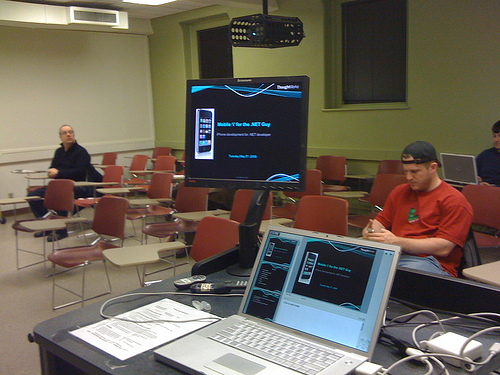
Last Tuesday I travelled down to Philadelphia to speak at the Philly ALT.NET meeting. Brian Donahue, the group organiser, invited me to talk about my experience of developing iPhone application from a .NET perspective. Over 20 people turned up and I was surprised that most of them already owned an iPhone and a Mac (remember this is a .NET group afterall).

I began with listing out the things require for iPhone development (hardware and software), then moved onto comparing Objective-C/Xcode with C#/Visual Studio. I showed a quick code demo to illustrate my points on language and environment differences. Finally I talked about the good, bad, and ugly things I feel about iPhone development up to this point.

This is the first time I gave this talk and feel the Philly audience got good value from my experience. The event was hosted at Drexel University campus and a few of the iSchool students were in the audience. One of them even came up to me afterward and asked whether I’d be interested in doing more talks on iPhone development for iSchool!

Here are the slides I presented:


One of the attendee also took some videos and I’ll post them as soon as I receive the link.


Website Built with WordPress.com.

Up ↑